
File Upload
FileCodeBox provides multiple flexible file upload methods, supporting both regular upload and chunked upload to meet different scenario requirements.
Upload Methods
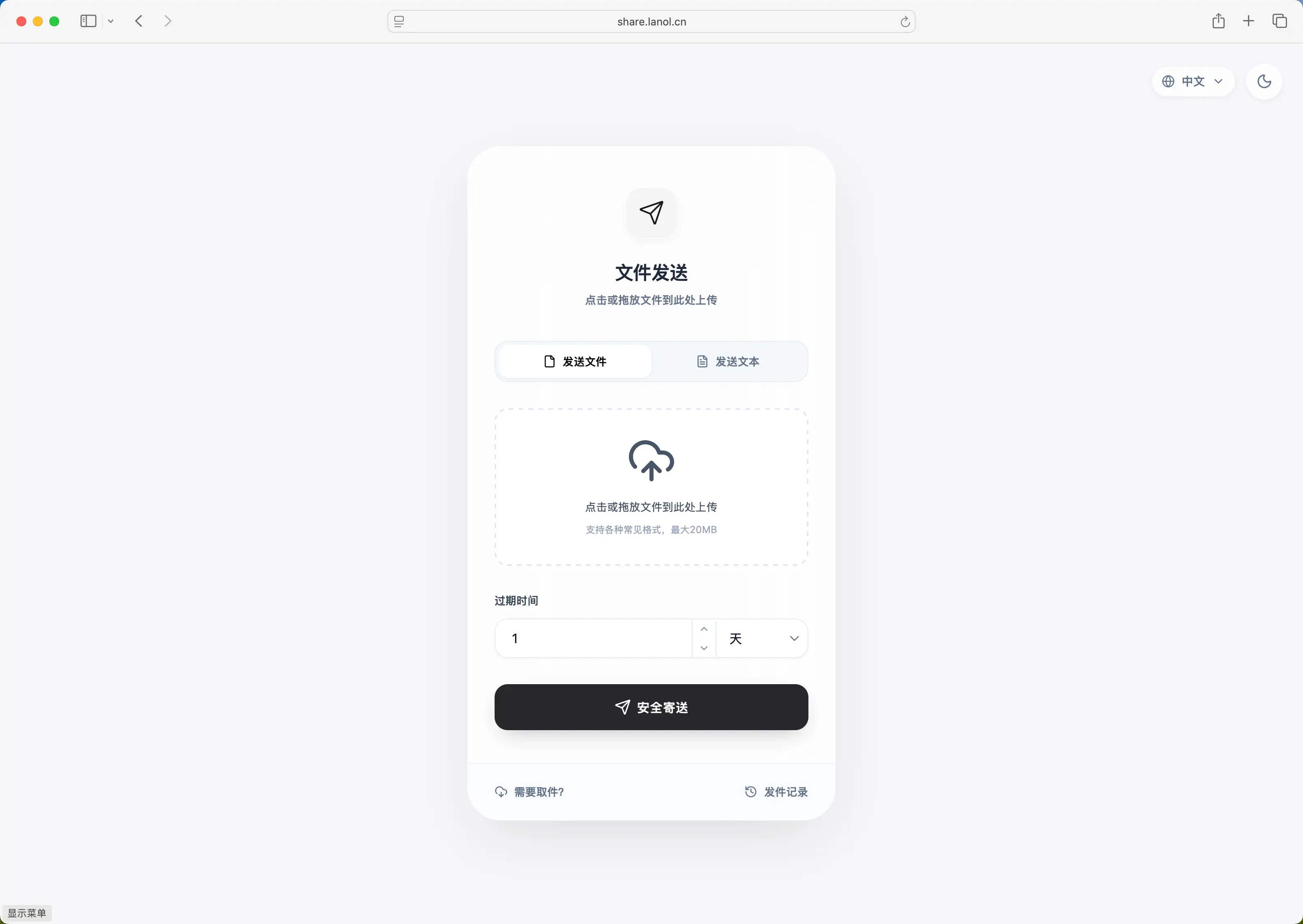
FileCodeBox supports the following upload methods:
Drag and Drop Upload
Drag files directly to the upload area to start uploading. This is the most convenient upload method.
- Open the FileCodeBox homepage
- Drag files from your file manager to the upload area
- Release the mouse, file upload begins
- Get the extraction code after upload completes
Tip
Drag and drop upload supports dragging multiple files simultaneously (depending on theme support).
Click Upload
Click the upload area to select files through the system file picker.
- Click the "Select File" button in the upload area
- Select the file to upload in the popup file picker
- File upload begins after confirming selection
- Get the extraction code after upload completes
Paste Upload
Supports pasting images directly from clipboard for upload (supported by some themes).
- Copy an image to clipboard (screenshot or copy image)
- Use
Ctrl+V(Windows/Linux) orCmd+V(macOS) to paste in the upload area - Image upload starts automatically
- Get the extraction code after upload completes
Note
Paste upload only supports image formats, not other file types. Specific support depends on the theme being used.
File Size Limits
Default Limits
| Setting | Default | Description |
|---|---|---|
upload_size | 10MB | Maximum single file upload size |
Modify Upload Limits
Administrators can modify upload size limits through the admin panel or configuration file:
# Set maximum upload size to 100MB
upload_size = 104857600  # 100 * 1024 * 1024
Note
upload_size is in bytes. Common conversions:
- 10MB = 10485760
- 50MB = 52428800
- 100MB = 104857600
- 500MB = 524288000
- 1GB = 1073741824
Exceeding Limit Handling
When an uploaded file exceeds the size limit, the system returns a 403 error:
{
  "detail": "Size exceeds limit, maximum is 10.00 MB"
}
Regular Upload API
File Upload Endpoint
POST /share/file/
Content-Type: multipart/form-data
Request parameters:
| Parameter | Type | Required | Description |
|---|---|---|---|
file | file | Yes | File to upload |
expire_value | int | No | Expiration value, default 1 |
expire_style | string | No | Expiration method, default day |
Expiration method options:
| Value | Description |
|---|---|
day | Expire by days |
hour | Expire by hours |
minute | Expire by minutes |
forever | Never expire |
count | Expire by download count |
Response example:
{
  "code": 200,
  "detail": {
    "code": "654321",
    "name": "example.pdf"
  }
}
cURL example:
# Upload file (default 1 day expiration)
curl -X POST "http://localhost:12345/share/file/" \
  -F "file=@/path/to/file.pdf"

# Upload file with 7 days expiration
curl -X POST "http://localhost:12345/share/file/" \
  -F "file=@/path/to/file.pdf" \
  -F "expire_value=7" \
  -F "expire_style=day"

# Upload file with 10 downloads limit
curl -X POST "http://localhost:12345/share/file/" \
  -F "file=@/path/to/file.pdf" \
  -F "expire_value=10" \
  -F "expire_style=count"

# Share text
curl -X POST "http://localhost:12345/share/text/" \
  -F "text=This is the text content to share"

# Download file by extraction code
curl -L "http://localhost:12345/share/select/?code=YOUR_CODE" -o downloaded_file
When Authentication Required
If guest upload is disabled in admin panel (open_upload=0), you need to login first:
# 1. Login to get token
curl -X POST "http://localhost:12345/admin/login" \
  -H "Content-Type: application/json" \
  -d '{"password": "<admin-password-set-during-setup>"}'

# Returns: {"code":200,"msg":"success","detail":{"token":"xxx.xxx.xxx","token_type":"Bearer"}}

# 2. Upload file with token
curl -X POST "http://localhost:12345/share/file/" \
  -H "Authorization: Bearer xxx.xxx.xxx" \
  -F "file=@/path/to/file.pdf"

# 3. Share text with token
curl -X POST "http://localhost:12345/share/text/" \
  -H "Authorization: Bearer xxx.xxx.xxx" \
  -F "text=This is the text content to share"
Chunked Upload API
For large files, FileCodeBox supports chunked upload functionality. Chunked upload splits large files into multiple small chunks for separate uploading, supporting resume capability.
Prerequisite
Chunked upload functionality requires administrator enablement: enable_chunk=1
Chunked Upload Flow
┌─────────────┐     ┌─────────────┐     ┌─────────────┐
│  Initialize │ ──▶ │Upload Chunks│ ──▶ │  Complete   │
│   /init/    │     │  /chunk/    │     │ /complete/  │
└─────────────┘     └─────────────┘     └─────────────┘
                          │
                          ▼
                    ┌───────────┐
                    │   Loop    │
                    │each chunk │
                    └───────────┘
1. Initialize Upload
POST /chunk/upload/init/
Request parameters:
{
  "file_name": "large_file.zip",
  "file_size": 104857600,
  "chunk_size": 5242880,
  "file_hash": "e3b0c44298fc1c149afbf4c8996fb92427ae41e4649b934ca495991b7852b855"
}| Parameter | Type | Required | Default | Description |
|---|---|---|---|---|
file_name | string | Yes | - | Filename |
file_size | int | Yes | - | Total file size (bytes) |
chunk_size | int | No | 5MB | Chunk size (bytes) |
file_hash | string | Yes | - | SHA256 hash of the file |
Response example:
{
  "code": 200,
  "detail": {
    "existed": false,
    "upload_id": "abc123def456789",
    "chunk_size": 5242880,
    "total_chunks": 20,
    "uploaded_chunks": []
  }
}| Field | Description |
|---|---|
existed | Whether file already exists (instant upload) |
upload_id | Upload session ID |
chunk_size | Chunk size |
total_chunks | Total number of chunks |
uploaded_chunks | List of already uploaded chunk indices |
2. Upload Chunk
POST /chunk/upload/chunk/{upload_id}/{chunk_index}
Path parameters:
| Parameter | Description |
|---|---|
upload_id | Upload session ID returned during initialization |
chunk_index | Chunk index, starting from 0 |
Request body:
Content-Type: multipart/form-data
| Parameter | Type | Description |
|---|---|---|
chunk | file | Chunk data |
Response example:
{
  "code": 200,
  "detail": {
    "chunk_hash": "a1b2c3d4e5f6..."
  }
}
cURL example:
# Upload first chunk (index 0)
curl -X POST "http://localhost:12345/chunk/upload/chunk/abc123def456789/0" \
  -F "chunk=@/path/to/chunk_0"
3. Complete Upload
POST /chunk/upload/complete/{upload_id}
Path parameters:
| Parameter | Description |
|---|---|
upload_id | Upload session ID |
Request parameters:
{
  "expire_value": 7,
  "expire_style": "day"
}| Parameter | Type | Required | Description |
|---|---|---|---|
expire_value | int | Yes | Expiration value |
expire_style | string | Yes | Expiration method |
Response example:
{
  "code": 200,
  "detail": {
    "code": "789012",
    "name": "large_file.zip"
  }
}
Resume Upload
Chunked upload supports resume functionality. When upload is interrupted:
- Call the initialization endpoint again with the same
file_hash - Server returns
uploaded_chunkslist containing already uploaded chunk indices - Client only needs to upload chunks not in the list
- Call the complete endpoint after all chunks are uploaded
Example flow:
// 1. Initialize upload
const initResponse = await fetch('/chunk/upload/init/', {
  method: 'POST',
  body: JSON.stringify({
    file_name: 'large_file.zip',
    file_size: fileSize,
    chunk_size: 5 * 1024 * 1024,
    file_hash: fileHash
  })
});
const { upload_id, uploaded_chunks, total_chunks } = await initResponse.json();

// 2. Upload incomplete chunks
for (let i = 0; i < total_chunks; i++) {
  if (!uploaded_chunks.includes(i)) {
    const chunk = file.slice(i * chunkSize, (i + 1) * chunkSize);
    await fetch(`/chunk/upload/chunk/${upload_id}/${i}`, {
      method: 'POST',
      body: chunk
    });
  }
}

// 3. Complete upload
await fetch(`/chunk/upload/complete/${upload_id}`, {
  method: 'POST',
  body: JSON.stringify({
    expire_value: 7,
    expire_style: 'day'
  })
});
Error Handling
Common Errors
| HTTP Status | Error Message | Cause | Solution |
|---|---|---|---|
| 403 | Size exceeds limit | File exceeds upload_size limit | Reduce file size or contact administrator to adjust limit |
| 403 | Upload rate limit | Exceeded IP upload rate limit | Wait for limit time window before retrying |
| 400 | Invalid expiration type | expire_style value not in allowed list | Use a valid expiration method |
| 404 | Upload session not found | upload_id invalid or expired | Re-initialize upload |
| 400 | Invalid chunk index | chunk_index out of range | Check if chunk index is correct |
| 400 | Incomplete chunks | Chunk count insufficient when completing upload | Ensure all chunks are uploaded |
Rate Limiting
The system has rate limits on upload operations to prevent abuse:
| Setting | Default | Description |
|---|---|---|
upload_minute | 1 | Limit time window (minutes) |
upload_count | 10 | Maximum uploads within time window |
When rate limit is exceeded, you need to wait for the time window to pass before continuing uploads.
Error Response Format
{
  "detail": "Error message description"
}
Upload Configuration
Related Settings
| Setting | Type | Default | Description |
|---|---|---|---|
open_upload | int | 1 | Enable upload (1=enabled, 0=disabled) |
upload_size | int | 10485760 | Maximum upload size (bytes) |
enable_chunk | int | 0 | Enable chunked upload (1=enabled, 0=disabled) |
upload_minute | int | 1 | Upload rate limit time window (minutes) |
upload_count | int | 10 | Maximum uploads within time window |
expire_style | list | ["day","hour","minute","forever","count"] | Allowed expiration methods |
Configuration Example
# Allow 100MB file uploads, enable chunked upload
upload_size = 104857600
enable_chunk = 1

# Relax upload rate limit: max 50 uploads per 5 minutes
upload_minute = 5
upload_count = 50

# Only allow expiration by days and count
expire_style = ["day", "count"]
Next Steps
- File Sharing - Learn the complete sharing process
- Configuration Guide - Learn about all configuration options
- Storage Configuration - Learn about file storage methods
- Security Settings - Learn about security-related configurations